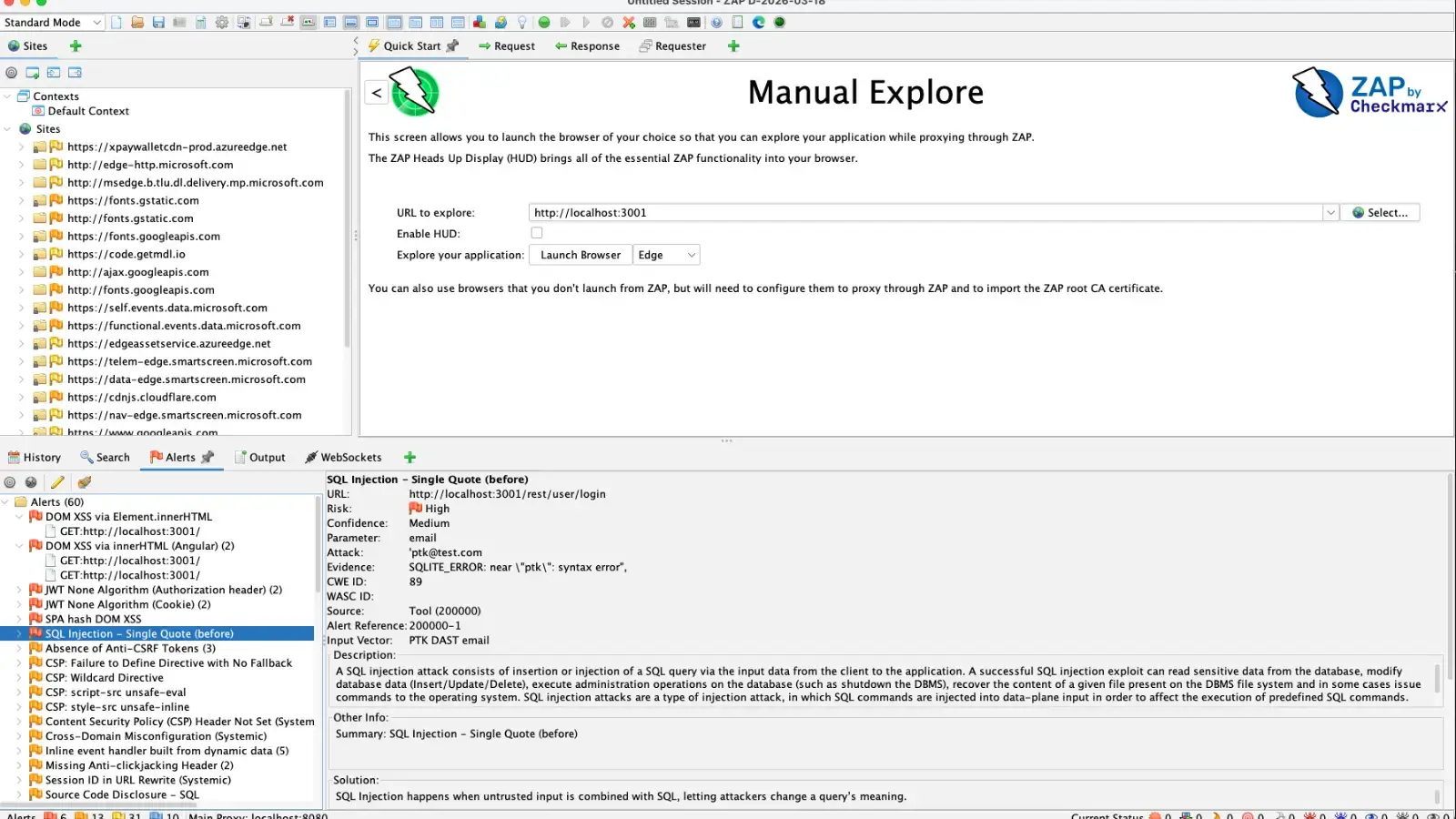

The OWASP Zed Attack Proxy (ZAP) just received a massive upgrade for testing modern web applications.
The release of the ZAP PTK Add-on 0.3.0, working alongside OWASP PenTest Kit (PTK) 9.8.0, now converts browser-based security findings directly into native ZAP alerts.
Traditionally, ZAP excels at analyzing server-side behavior, HTTP headers, and proxy-layer traffic.
However, modern Single Page Applications (SPAs) push significant security risks to the client side where standard proxy tools struggle to see them.
When testing modern web apps, traditional proxy tools often miss critical vulnerabilities hidden in the user interface.
Security flaws like DOM-based Cross-Site Scripting (XSS) or dangerous JavaScript patterns within minified code occur entirely inside the browser’s execution context.
Because these actions never trigger full page loads or send recognizable payloads back through the proxy, they remain invisible to standard scanners.
The PTK add-on solves this by running directly inside the browsers launched by ZAP. It monitors runtime signals and client-side code, bridging the gap between browser execution and proxy traffic.
Upgrading to PTK Add-on 0.3.0
According to ZaProxy, the newest version introduces a huge jump in vulnerability coverage, adding 142 PTK-tagged alert types directly into the ZAP dashboard.

The 0.3.0 update brings three major features:
- Native ZAP alerts surface browser findings directly into your normal testing workflow.
- Custom rule selection lets you choose between SAST, IAST, and DAST engines.
- Auto-start scanning optionally begins testing as soon as the ZAP browser launches.
For example, PTK IAST can now flag a tainted input reaching a sensitive DOM operation during runtime, even if the server response looks completely normal to the proxy.
Meanwhile, PTK SAST analyzes the actual JavaScript bundles your browser executes, catching unsafe innerHTML usage or dangerous third-party scripts that standard proxy scans miss.

How to Run Your First Scan
Testing this new integration is straightforward. You can practice using a deliberately vulnerable application like OWASP Juice Shop to see how client-side alerts populate in ZAP.

Follow these steps to get started:
- Open the ZAP Marketplace and install or update the OWASP PTK add-on.
- Navigate to Tools → Options → OWASP PTK and enable the SAST, IAST, and DAST engines.
- Use ZAP’s Quick Start to launch Chrome or Firefox against your target URL.
- Browse the application normally by logging in, searching, and clicking through workflows so PTK can observe real authenticated traffic.
- Click the PTK extension icon in the browser to start the scan manually.
- Open the Alerts tab in ZAP to review the newly generated client-side findings alongside your standard proxy alerts.
Follow us on Google News, LinkedIn, and X to Get Instant Updates and Set GBH as a Preferred Source in Google.