

Microsoft has unveiled Administrator Protection, a groundbreaking security feature for Windows 11 designed to safeguard systems against privilege escalation attacks.
This new capability creates a security boundary around administrative operations, significantly reducing the attack surface that hackers exploit when targeting elevated processes.
According to Microsoft’s Digital Defense Report 2024, token theft incidents have escalated to approximately 39,000 daily occurrences, highlighting the critical need for enhanced privilege protection mechanisms.
Administrator Protection fundamentally redesigns Windows’ User Access Control (UAC) architecture by implementing a hidden, system-managed, profile-separated local user account that generates isolated admin tokens.
This architecture prevents user-level malware from compromising code running in elevated contexts, effectively establishing elevation as a security boundary.
“Running applications are most vulnerable to attacks when operating with elevated privileges,” notes the technical documentation.
The risk intensifies when malicious code executes while elevated, potentially capturing tokens and facilitating lateral movement within organizational networks.
The new feature enforces the Principle of Least Privilege by eliminating auto-elevation functionality a mechanism previously exploited in UAC bypass attacks where malware could silently gain administrative privileges without user consent.
With Administrator Protection enabled, users must explicitly authorize every administrative operation, maintaining complete control over privileged actions.
Administrator Protection to Authorize Operation
The technical implementation revolves around a System Managed Administrator Account (SMAA) with a unique security identifier (SID).
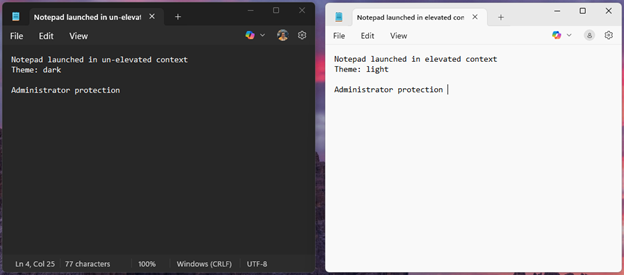
Unlike the traditional split-token model where both elevated and unelevated processes shared access to common resources, Administrator Protection creates non-persistent admin tokens generated just-in-time for specific elevation tasks.
These tokens are immediately discarded upon task completion, limiting exposure of privileged credentials to only the requesting process’s lifetime.
This design effectively mitigates classic UAC bypass techniques such as registry key manipulation and environment variable overloading attacks.
The security architecture creates separate file system directories and registry hives for the SMAA, preventing privileged and unprivileged processes from accessing shared resources.
Windows Hello integration provides an additional authentication layer, requiring biometric or PIN verification before granting administrative privileges.
Timeline and Compatibility Considerations
Currently available to Windows Insiders in the Canary channel (build #27718 and higher), Administrator Protection will soon expand to the Dev channel with plans for broader deployment in the 24H2 release.
Microsoft intends to enable this feature by default in supported editions: Windows 11 Home, Professional, Enterprise, and Education.
Application developers must adapt to this new paradigm by implementing granular privilege elevation rather than elevating up-front.
Microsoft recommends installing applications in unelevated contexts whenever possible and storing application files in appropriate directories to maintain accessibility across contexts.
Some compatibility challenges exist, particularly with complex development environments. Visual Studio, for instance, exhibits certain incompatibilities when running elevated with Administrator Protection enabled including issues with extensions installed in per-user locations and settings stored in user-specific directories.
Microsoft emphasizes that the feature aims to “provide a secure and convenient way to authorize the use of admin privileges” while ensuring users “stay in control of changes to their Windows device”.
Find this News Interesting! Follow us on Google News, LinkedIn, & X to Get Instant Updates!


.webp?fit=1600,900&ssl=1&description=Microsoft has unveiled Administrator Protection, a groundbreaking security feature for Windows 11 designed to safeguard systems.)