

A new security vulnerability targeting Amazon Machine Images (AMIs) has emerged, exposing organizations and users to potential exploitation.
Dubbed the “whoAMI name confusion attack,” this flaw allows attackers to publish malicious virtual machine images under misleading names, tricking unsuspecting users into deploying them within their Amazon Web Services (AWS) infrastructure.
Understanding the AMI Vulnerability
Amazon Machine Images (AMIs) are pre-configured virtual machine templates used to launch EC2 instances in AWS.

While AMIs can be private, public, or purchased through the AWS Marketplace, users often rely on AWS’s search functionality via the ec2:DescribeImages API to find the most recent AMIs for specific operating systems or configurations.
However, if users or organizations fail to apply specific security measures, such as specifying trusted “owners” during the AMI search process, they may inadvertently use an unverified or malicious image.
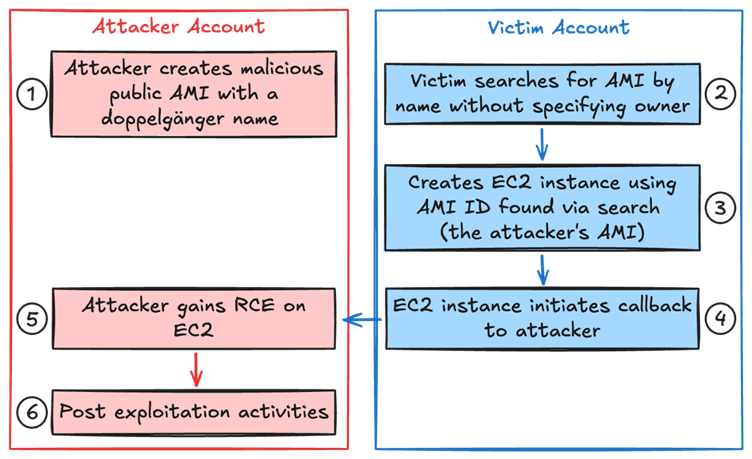
This vulnerability, classified as a name confusion attack, exploits situations where organizations rely on AMI names or patterns without verifying the image’s source or owner, as per a report by Data Dog Security Labs.
By publishing a malicious AMI with a name resembling legitimate ones (e.g., matching patterns such as “ubuntu/images/hvm-ssd/ubuntu-focal-20.04-amd64-server-*”), attackers can ensure their AMI appears as the “latest” in search results.
Once deployed, these malicious AMIs can act as backdoors, exfiltrating sensitive data or enabling unauthorized access to systems.
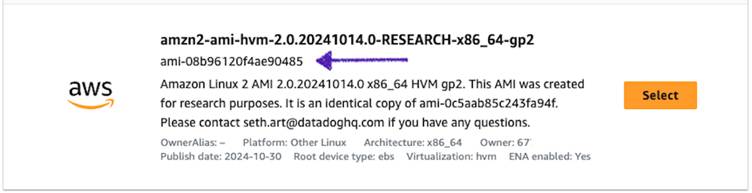
In one reported instance, researchers demonstrated the attack by creating a malicious AMI named “ubuntu/images/hvm-ssd/ubuntu-focal-20.04-amd64-server-whoAMI” that mimicked legitimate resources.
This malicious AMI was successfully retrieved and used by vulnerable configurations.
Attack Mechanics and Exploitation
The vulnerability arises due to a misconfiguration in how AMI searches are performed.
For example, using the following Terraform code for AMI retrieval can result in vulnerabilities if the “owners” attribute is omitted:
data "aws_ami" "ubuntu" {
  most_recent = true
  filter {
    name   = "name"
    values = ["ubuntu/images/hvm-ssd/ubuntu-focal-20.04-amd64-server-*"]
  }
}
This configuration results in Terraform querying the ec2:DescribeImages API, returning a list of all AMIs matching the search criteria—including those from untrusted or malicious sources.
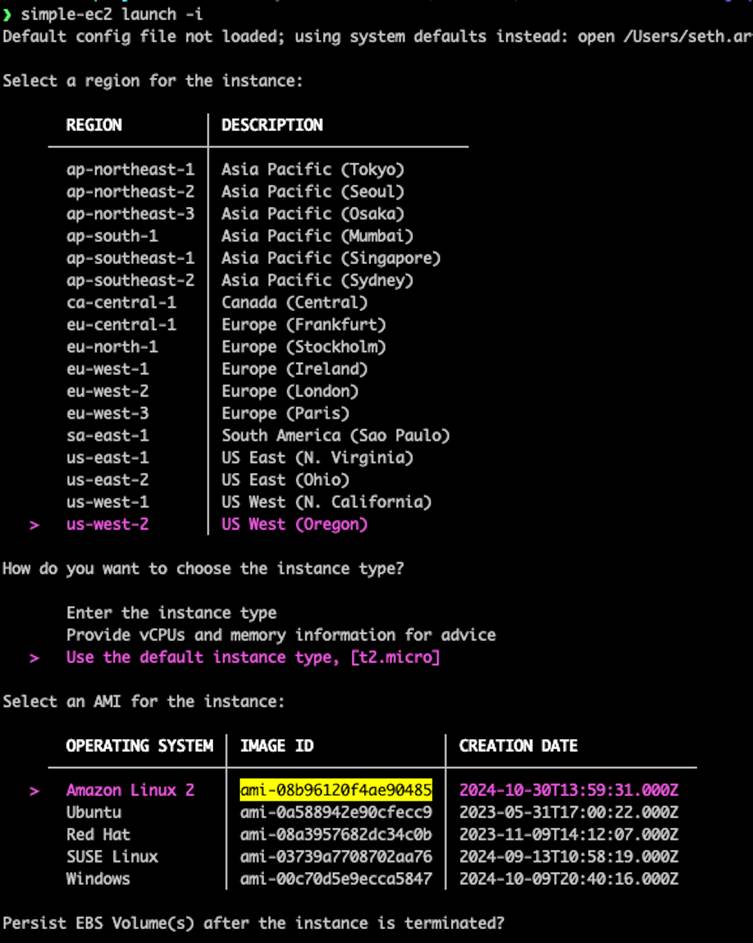
If the most_recent=true attribute is applied, Terraform automatically selects the newest AMI, which could be an attacker’s malicious resource.
Attackers can exploit this by publishing public AMIs with names that include keywords like “amzn”, “ubuntu”, or other well-known patterns, ensuring that their AMI is selected by automated or human-driven searches.
Once selected, the malicious AMI can include backdoors, malware, or other harmful elements, making it a serious threat to cloud security.
Mitigation and Prevention
- Use Owner Filters: Always specify owners when querying AMIs. Trusted values include amazon, aws-marketplace, or well-known AWS account IDs such as 137112412989 (Amazon Linux).Example of a safer AWS CLI query:
aws ec2 describe-images \
  --filters "Name=name,Values=amzn2-ami-hvm-*-x86_64-gp2" \
--owners "137112412989"- Adopt AWS’s Allowed AMIs Feature: Introduced in December 2024, this feature allows AWS customers to create an allowlist of trusted AMI providers, ensuring that EC2 instances are only launched using images from verified accounts.
- Update Terraform and IaC Tools: Ensure you are using updated versions of Terraform or other infrastructure-as-code tools. Recent updates include warnings or errors for improper AMI searches (e.g., Terraform’s aws_ami provider now alerts users if most_recent=true is used without specifying owners).
- Perform Code Audits: Utilize tools like Semgrep to search for risky patterns in your codebase, including Terraform, CLI scripts, and programming languages like Python, Go, and Java.Example Semgrep rule to detect risks:
rules:
- id: missing-owners-in-aws-ami
    languages:
      - terraform
    patterns:
      - pattern: |
          data "aws_ami" $NAME {
            ...
            most_recent = true
          }
      - pattern-not: |
owners = $OWNERS- Monitor Current Instances: Use tools like the open-source whoAMI-scanner to audit your AWS accounts for instances launched from unverified AMIs. This tool provides a comprehensive list of instances using AMIs that are public or non-allowlisted.
AWS has acknowledged the potential impact of this vulnerability and has worked with researchers to address it.
According to their statement, the affected systems within AWS environments were non-production and had no customer data exposure.
In addition, AWS introduced the Allowed AMIs feature to mitigate such risks and encouraged customers to implement this guardrail.
The “whoAMI” vulnerability underscores the critical need for secure configurations and due diligence when operating in cloud environments.
Organizations must adopt secure practices, such as validating AMI ownership during searches and leveraging AWS’s new security features.
With thousands of accounts potentially affected, maintaining vigilance is essential to protecting sensitive workloads and data on AWS.
Investigate Real-World Malicious Links & Phishing Attacks With Threat Intelligence Lookup - Try for Free







 has emerged, exposing organizations and users to potential exploitation.)